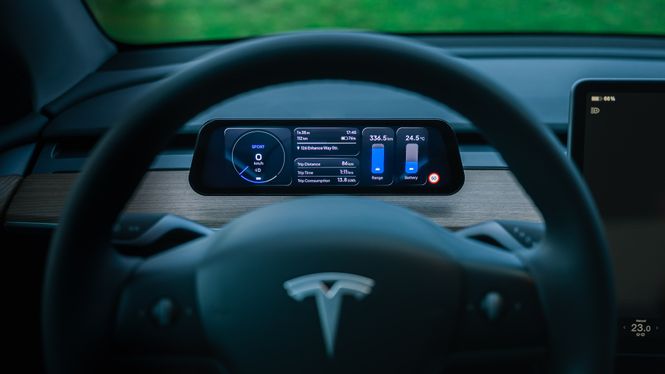
9.6" speedometer with touchscreen that is seamlessly integrated with your Tesla Model 3 (2018 - 2020).
The information you see on the screen can be easily customized to your needs and desires. The S3XY Dash also comes with Apple CarPlay and Android Auto.
Supplied:
- S3XY Dash speedometer/display
- Screen mount and holder
- Power cable for monitor
- S3XY Commander v.2 incl. cable set for your Tesla Model 3 (2018 - 2020)
If you already have S3XY Commander version 2, you can buy just S3XY dash here!
Set up S3XY Dash the way you want!
The screen has almost endless design customization options so you can easily access the information from your car that you need and want. You can set up multiple layouts on the screen, and easily choose between your layouts with the left scroll wheel on the steering wheel, directly on the touchscreen with your finger, or automatically change the layout based on whether the car is in D (drive), P (park), Autopilot activated, during supercharging, etc.
Manual activation of functions directly from the steering wheel!
You can easily use the left scroll wheel on the steering wheel to select functions you have added to the screen. Select a function, press, and adjust/activate the selected function:
- Adjusting regeneration
- Enable or disable battery heating
- Adjust the fan on the air conditioner.
- Adjusting the air conditioning temperature
- etc.
Easy installation!
Can be mounted directly behind the steering wheel of the car (will affect the airflow from the vents), or on top of the dashboard. Installs in the car in 15-30 minutes - even faster if you already have S3XY Commander (version 2) installed in the car.
- Determine the location of the S3XY Dash speedometer.
- Power for the screen is most easily obtained from the USB sockets at the rear of the center console.
- The S3XY Commander is mounted in the front footwell on the passenger side.
- Install the S3XY app, connect, get started with usage and setup.
Fully integrated with existing S3XY products.
S3XY Dash will display any changes and adjustments you make via the S3XY Knob, S3XY Buttons, or the S3XY app. If you already have an S3XY Commander installed in your car, simply pair the S3XY Dash with your existing commander via Bluetooth after installation and start the setup.
Displays information about the car in real time:
- Speed
- Blind spot warning
- Regeneration level
- Battery temperature
- Engine temperature
- Remaining range in percent and kilometers
- Arrival time at destination (navigation active)
- Charging speed
- And much, much more